LED Rostrum Rental in Singapore: 2026 Guide for Events

A rostrum used to be a simple stand for notes and a microphone. In 2026, it can also be a luminous centrepiece, a content screen, a photo moment, and a clean way to tie a stage into the event theme.

That is why LED rostrums are becoming a practical choice for Singapore events. They work well in hotel ballrooms, wedding venues, exhibition halls, product launches, awards nights, and hybrid event setups where the stage needs to look polished on camera.
The right unit can display a logo, event title, couple’s initials, sponsor loop, animated pattern, or simple colour wash. The wrong unit can look too bright, be hard to read, or clash with the staging. This guide covers the latest options, what to look for, how pricing usually works, and how to choose a suitable model for different event formats.
What makes an LED rostrum different from a standard podium

A standard rostrum does one job. It gives a speaker a place to stand, hold notes, and use a microphone.
An LED rostrum does that, then adds a visual layer. Depending on the model, it may include illuminated acrylic panels, built-in LED strips, a front-facing screen, or a modular LED display panel. This is where the format matters.
Common rental options in Singapore include:
Type | Best for | What to check |
Illuminated acrylic rostrum | Weddings, gala dinners, award nights | Colour options, brightness control, cable routing |
LED screen rostrum | Product launches, conferences, exhibitions | Screen resolution, content format, controller setup |
Branded lightbox rostrum | Ceremonies, sponsor-heavy events | Print or digital branding method |
Minimal modern LED podium | Luxury events, small stages, VIP receptions | Finish quality, height, microphone compatibility |
Custom scenic rostrum with LED | Large productions and themed events | Build time, transport, approval from venue |
The current trend is toward cleaner front panels, smoother brightness control, and content that looks good both in the room and on camera. Event teams no longer want a rostrum that flashes for attention. They want one that fits the set design.
For many events, the most useful choice is not the brightest unit. It is the one with controlled light, readable content, and stable AV integration.
A good rental partner should ask about the venue, stage size, run order, speaker height range, camera angles, and whether the rostrum needs to carry live graphics or static branding. If they only ask for a date and delivery address, keep asking questions.
Key LED features and technology trends to watch in 2026

LED event equipment has improved quickly, and rostrums are benefiting from the same changes seen in LED walls, digital signages, and stage effects. The best choices for 2026 focus less on gimmicks and more on reliability.
Better brightness control
Singapore venues vary a lot. A hotel ballroom with warm lighting needs a different brightness level from an exhibition hall under intense overhead lights. Outdoor sheltered setups need even more care.
Look for LED rostrums with adjustable brightness. If the unit is too bright, faces can look washed out in photos and livestream feeds. If it is too dim, the branding may disappear from the back of the room.
For screen-based models, ask whether the brightness can be adjusted during setup and whether the operator can make small changes after test shots.
Higher pixel density for closer viewing
Pixel pitch matters when the audience is close to the stage. A large LED wall viewed from across a hall can use a wider pixel pitch. A rostrum sits near cameras and front-row guests, so the screen needs to look clean at short range.
For an LED screen rostrum rental, ask the supplier:
What is the viewing distance?
Will the content show text, logos, video, or patterns?
Does the screen photograph well at close range?
Can they provide a content template before the event?
Simple artwork often works best. Big titles, clean logos, and slow motion graphics usually look more premium than busy animations.
Camera-friendly refresh rates
If the event will be photographed, filmed, or livestreamed, camera performance matters. Some lower-grade LED displays may flicker on video. Better screen systems offer higher refresh rates and more stable camera capture.
Do a camera test during setup if the event includes livestream, broadcast recording, or large IMAG screens.
Modular and lighter builds
Event schedules in Singapore can be tight. Venues often have strict loading bays, service lift timings, carpet protection rules, and teardown deadlines. Lighter modular rostrums help crews move faster and reduce risk during setup.
A modular design can also make it easier to match different themes. The same core unit may support different front panels, colours, wraps, or LED content.
Cleaner cable management
Messy cables can make even a good rostrum look unfinished. Ask how power, HDMI, SDI, or controller cables will be hidden. This matters most for weddings, luxury dinners, and media events where guests may view the stage from several angles.
How to choose the right LED rostrum for each event type

The best rostrum is the one that supports the event format. A wedding stage, a keynote stage, and an exhibition booth have very different needs.
Corporate functions and conferences
For conferences, launches, seminars, and award ceremonies, the rostrum must look professional without distracting from the speaker. The content should match the event identity, but speech clarity and camera visibility come first.
Choose a rostrum with:
A flat top that can hold notes, clickers, tablets, or cue cards
Gooseneck microphone support
Enough internal space for cable runs
Camera-friendly lighting
A front display that can show clear static branding
Avoid fast animation while someone is speaking. It can pull attention away from the message. A static event logo, subtle gradient, or slow ambient loop usually works better.
If the event has sponsors, check whether the rostrum front can rotate between brand marks during breaks, then return to the main event look during sessions.
Weddings and solemnisation ceremonies
For weddings, the rostrum often appears in photos and videos. The design should feel warm, elegant, and not too technical. Acrylic LED rostrums are popular because they can glow softly without dominating the stage.
Good choices include:
Warm white, champagne, blush, or soft gold lighting
Couple initials or monogram display
Clear acrylic or frosted panels
Lower brightness for photography
Hidden wiring and minimal equipment clutter
For solemnisation, check the height and top surface. The rostrum may need to hold a book, certificate folder, tablet, or microphone. It should feel stable and not wobble when touched.
A wedding rostrum should support the ceremony rather than steal the scene. Subtle lighting is usually more beautiful than a bright animated screen.
Exhibitions and trade shows
At exhibitions, attention is harder to win. A rostrum with an LED screen can help a booth stand out, especially when staff need a compact point for demos, sign-ups, or product explanations.
For exhibition use, prioritise:
Strong brightness for hall lighting
Durable surfaces
Fast setup and teardown
Storage space if needed
Power safety and tidy cable paths
Content that reads from several metres away
A booth rostrum may display a product name, demo schedule, QR code, or short loop. Keep text large. Visitors walk past quickly, so the screen should communicate in seconds.
If the rostrum will sit near an aisle, ask about footprint and stability. Narrow walkways and crowded show floors leave little room for oversized equipment.
Gala dinners and awards nights
For gala events, the rostrum needs stage presence. It may appear in hundreds of photos as hosts, winners, and VIP guests step up to speak.
Choose a model that matches the scenic design. If the stage has LED walls, uplights, and truss lighting, the rostrum should match the colour temperature and content style. If the event has a luxury theme, a high-gloss or acrylic finish may work better than a screen-heavy build.
A useful approach is to treat the rostrum as part of the stage set, not a separate rental item.
Pricing and led rostrum rental services in Singapore
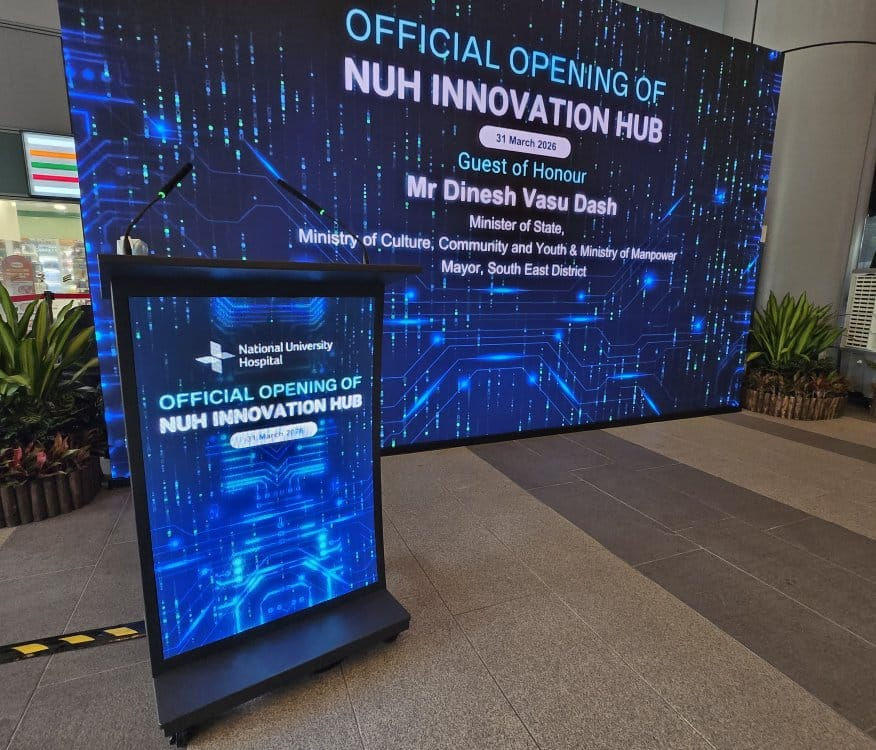
Pricing for rostrum rental in Singapore varies because the word “LED rostrum” can mean several different products. A simple illuminated acrylic unit costs less than a custom scenic podium with a built-in LED screen and technical operator.
Rather than relying on a single headline price, ask each supplier for a detailed quote. Most rental pricing is shaped by:
Cost factor | Why it affects price |
Rostrum type | Screen-based and custom units cost more than simple illuminated models |
Rental duration | Multi-day events may include holding charges |
Delivery location | Access, parking, and loading rules can affect labour |
Setup timing | Late-night or early-morning calls may cost more |
Content support | Formatting, testing, and playback support may be charged separately |
Technical crew | Complex setups may need an AV technician on site |
Branding | Printed decals, custom panels, or motion graphics add cost |
Venue requirements | Safety checks, power planning, and protection materials may be needed |
For a basic event, the rental may include the rostrum, delivery, setup, and collection. For a larger production, the quote may include design coordination, LED control equipment, cabling, technician standby, and rehearsal support.
When comparing suppliers, do not shop by price alone. A cheaper unit can become costly if it arrives scratched, flickers on camera, or cannot support the microphone setup.
Ask these questions before booking:
Can you send recent photos or videos of the actual rental unit?
What are the dimensions and weight?
Is the lighting dimmable?
What content format do you need for the screen?
Does the price include delivery, setup, and collection?
Is there a technician during the event?
Can the rostrum support wired and wireless microphones?
What happens if the LED panel or controller fails?
Search terms can vary between suppliers. Some may list the service as led podium rental, led podium, led screen rostrum rental, led screen podium rental, or “rent podium with LED screen”. Use the product photos and specifications to confirm what is actually included.
Inventory changes, so check current catalogues and photos before shortlisting. Some companies may offer standard rostrums only, while others can build or customise LED-facing units for larger events.
If the event has a strong visual identity, share the stage render, colour palette, logo files, and agenda early. That helps the rental team recommend the right size, brightness, and content setup.
Smart booking tips before confirming your rental

LED rostrums look simple when everything works. Behind the scenes, they touch stage design, AV, lighting, power, branding, and venue operations. A little planning prevents most issues.
Start with the stage plan. Mark where the rostrum will sit, where speakers enter, and where cameras point. If the rostrum is too far forward, it may block stage steps or monitors. If it is too far back, the speaker may look distant.
Check the microphone setup early. Some rostrums support two gooseneck microphones. Others need a clip-on mic, tabletop stand, or wireless handheld arrangement. If the top panel is acrylic or glass, confirm how mounts will attach without damage.
Prepare content in the right size. A supplier should tell you the screen ratio and pixel dimensions. Do not send a complex slide deck and expect it to fit. For LED rostrums, content should be designed for the display area.
Good content rules include:
Use a simple background
Keep logos large
Avoid small text
Use slow movement
Test colours on the actual screen
Prepare a fallback static image
Plan for power. Even a small LED rostrum needs safe cabling. In Singapore venues, cables across walkways usually need ramps, tape, or alternate routing. For public events, safety should be handled before styling.
Schedule setup time for testing. The rostrum may need brightness adjustment after house lights, stage lights, and cameras are active. A 10-minute test can save a full event album from glare or flicker.
FAQ
How far ahead should an LED rostrum be booked in Singapore?
For standard units, book at least a few weeks ahead when possible. For customised panels, screen content, or peak event periods, allow more time so the supplier can confirm stock, artwork, crew, and venue access.
Can the LED rostrum show a logo or wedding monogram?
Yes, many LED rostrums can display a logo, monogram, event title, or simple animation. Ask for the required file type, screen size, and content deadline before sending artwork.
Is an LED rostrum suitable for livestreamed events?
Yes, but the LED display must be camera-friendly. Ask about refresh rate, brightness control, and test the rostrum under the same lighting used for the livestream.
What is usually included in the rental price?
A basic quote may include the rostrum, delivery, setup, and collection. More complex rentals may add content formatting, technical crew, controller equipment, extended hours, or custom branding.
Should I choose an acrylic LED rostrum or an LED screen rostrum?
Choose acrylic LED for elegant ambience and simple branding. Choose an LED screen rostrum when you need digital content, sponsor rotation, product visuals, or stronger exhibition impact.
A well-chosen LED rostrum rental service makes the stage feel complete
The best LED rostrum is not always the biggest or brightest. It is the one that fits the room, supports the speaker, photographs well, and carries the event identity without adding clutter.
For corporate events, focus on clarity, microphone support, and camera performance. For weddings, keep the light soft and the design elegant. For exhibitions, choose visibility, durability, and fast setup. For gala dinners, match the rostrum to the full stage design.
If you are comparing event equipment and led rostrum rental options in Singapore, request a quote through Electric Dreamz LED rostrum rental in Singapore. A clear brief, stage plan, and content sample will help the supplier recommend a rostrum that looks right on the day and in every photo after.


Comments